





Tablet and Smartphone
The apps for Android and iOS are installed via the respective app store (each with a 9.99 EUR fee):
- Android app via Google Play Store
- iOS app via App Store
Note: We decided on the fee in the Play Store to reduce unnecessary downloads and resulting reviews.
Linux, Mac and Windows
For the PC application, you can find installers for Linux, Mac OS/X, and Windows in our download section . The installers will create appropriate start menu entries.
Note: Python is no longer required since CTC-App 5.0.
MacOS/X
If MacOS/X refuses installation, it may be due to a missing internet connection – the signature requires online access.
Linux
If Linux refuses installation, open it with the "QApt package installer" or install it via the command line, for example for CTC-App version 4.24:
sudo apt install ./ctc-app_4.24_amd64.deb
Windows
Windows 10 and 11 sometimes complain about a missing signature:
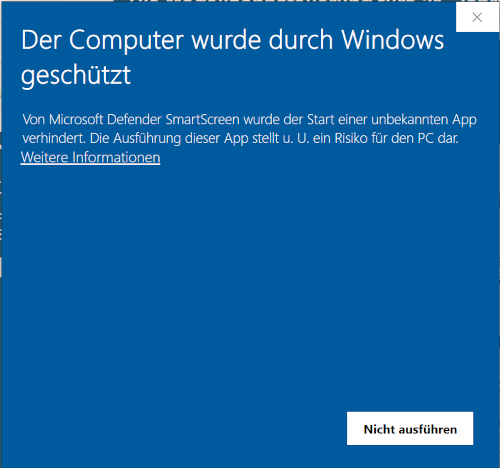
Then simply click on the "More information" link. This will display the "Run anyway" button:
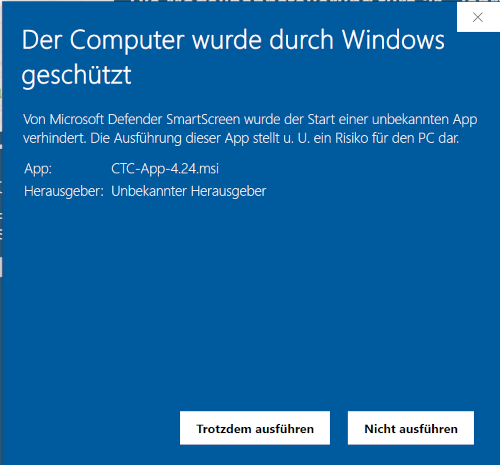
Now you can click "Run anyway" to install the CTC-App.
To access the WiFi on Windows 11, the "Location services" must be enabled and granted for apps.
Zip file – manual installation for experts
Especially for Linux variants currently not supported, the CTC-App can also be installed manually (by experts):
- Download and extract the zip file.
- The appropriate Java 25 **Full** JRE (including JavaFX) must be installed or extracted.
- The CTC-App is started in the bin folder of the extracted CTC-App with
java -jar CTC-Desktop.jar
If only the JRE was extracted, the full path to the "java" program of the Full JRE 21 must be specified before "java".