





Over the menu, the "Statistics" dialog can be opened.
There, data (since the start of the CTC-App) for all CTC-Modules is collected:
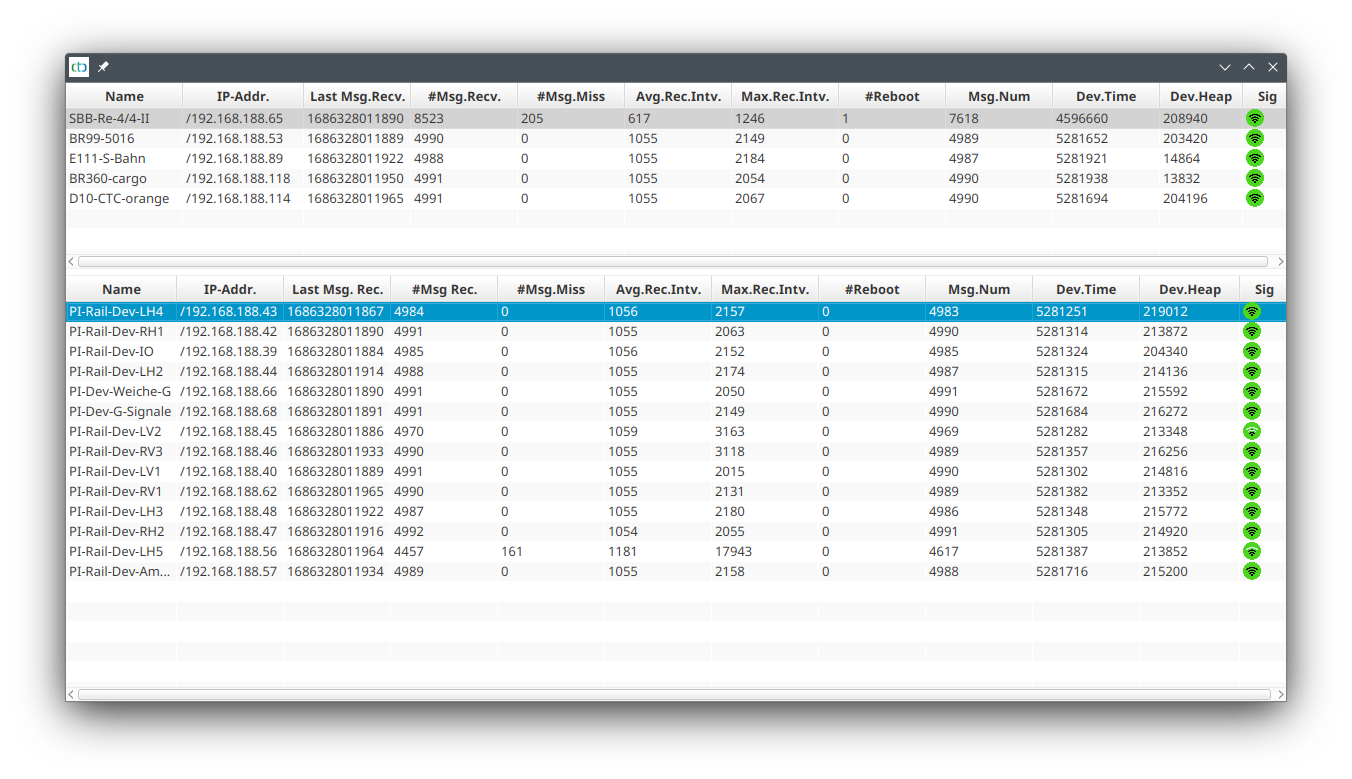
| Column | Meaning |
| Name | Name of the CTC-Module |
| IP-Addr. | Current IP address of the CTC-Module |
| Last Msg. Rec. | Timestamp (app) when the last message from the CTC-Module was received |
| #Msg Rec. | Number of messages the CTC-App received from the CTC-Module |
| #Msg.Miss | Number of sync messages to which the CTC-Module did not respond |
| Avg.Rev.Intv. | Average interval between two responses to the sync message |
| Max.Rec.Intv. | Maximum interval between two responses to the sync message |
| #Reboot | Number of reboots of the CTC-Module |
| Msg.Num | Running number of the message from the CTC-Module |
| Dev.Time | System time of the CTC-Module |
| Dev.Heap | Free heap memory on the CTC-Module |
| Sig | WiFi signal quality |
A small number in "#Msg.Miss" is not a problem. If failures are frequent for individual or even all CTC-Modules, you should optimize your WiFi. Some tips can be found in Chapter 3 - "WiFi"