





With CTC Version 4, our IR transmitters and NFC tags are really taking off Automatic operation and train protection based on real railway systems (ETCS train protection system ) are now a breeze.
At Pentecost weekend 2022, we presented the new Version 4 of CTC in Burgdorf (CH):
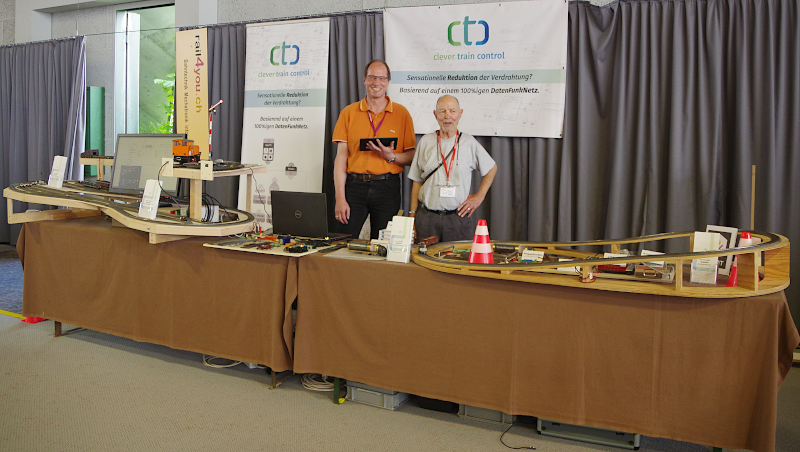
The new version handled the trade show stress well and can be downloaded in the download section or accessed via the app stores.
In addition to the new features, there were of course numerous bug fixes in the CTC app and firmware. And as before: CTC Version 4 is available as a free update for all CTC modules sold to date.
Automation and Train Protection
Most of the new features in CTC 4 revolve around automation and train protection.
The original idea of only implementing a few simple automation functions for shuttle train operation and station stops was quickly abandoned after the first locomotives collided head-on. Without additional train protection functions, automation seemed too difficult to control.
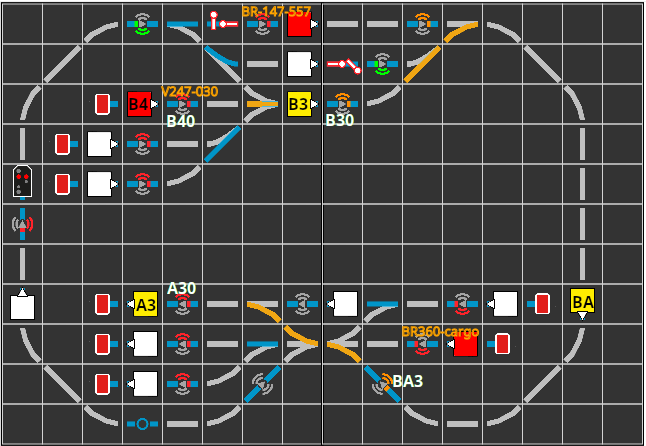
Thus, with Version 4, CTC now has everything a modern, prototype-accurate train control system needs:
- Blocks
- Routes
- Timetables for the locomotive
Throughout the documentation, the term "ID transmitter" has been replaced by "balise" and accordingly "IR transmitter" by "IR balise" and "NFC tag" by "NFC balise".
The commands transmitted by balises have been significantly expanded and now take into account the direction of travel of the locomotive.
Detailed explanations can be found in the new Chapter 7 - Automation of the user manual.
NEW: Block Control
Each balise is automatically assigned to a block, identified by the first two characters of the 3-character ID of the balise.
- Blocks can be placed in the track diagram and display their status (free, occupied, reserved) there.
- Each block can have two signals for its two ends assigned as exit signals.
- When an exit signal turns green, the locomotive waiting in the block starts moving again.
NEW: Routes
A route establishes the connection between two blocks by setting all the turnouts in between accordingly.
A route reserves the destination block and all turnouts and signals to be switched before they are actuated. These turnouts and signals cannot be switched again until the locomotive has reached the destination block of the route.
NEW: Timetables
A timetable adds one or more route commands to the commands that the locomotive must pass through balises. A command can be stored for each balise. The list of balises is transferred to the locomotive as an electronic timetable and processed independently by it.
Locomotives
- The locomotive now knows 9 different direction-dependent commands
- Locomotive detects and reports direction of travel
- The direction of travel can be set - for automatic operation it must be set
- Commands for the opposite direction are ignored
- The locomotive control displays the (automatic) status of the locomotive
- An emergency stop button brings the locomotive motor to a standstill in max. 0.5 seconds
Multi-motor Locomotives
- Control revised, e.g. max speed
Groups
Each functionality (action) is assigned to a group.
- Groups can now be defined freely
- The assignment of actions to groups is changeable
- The control panel display now allows switching between groups
Operational Safety
- Each switching command is checked to see if it has been received and is resent if necessary
- In scripts, the CTC app waits until receipt of a switching command has been confirmed before proceeding to the next step
- Emergency stop buttons on the locomotive control for the displayed locomotive and on the control panel for all locomotives
Turnouts and IO Board
- New status is reported immediately after executing the command, instead of the next status as before
CTC App
- The color of the locomotive display in the track diagram has been adjusted
- Signal icons have been revised (contrast improved)
- In the locomotive control, the status of automatic operation is displayed with an icon
- Support for crossings with 4 states including appropriate icons
- Display of the currently transmitted command from a balise
- Selection and display of the current timetable including start/stop/setting of model time
Config
- In the Actions tab, parameters can now be added, removed and changed
- "Edit Automation" dialog supplemented with blocks, routes and driving orders
- New "Edit Timetable" dialog
- New selection boxes for many fields that previously only had a text field
- Various additions in the product catalogs
Z21 WiFi Protocol
With CTC 4, full support of the Z21 WiFi protocol is gradually being aimed for. In this first version, locomotives connected to the Z21 central unit can be controlled.
Migration from CTC 3 to CTC 4
When switching from CTC 3 to CTC 4, the following must be adjusted:
- All balises created with CTC 3 should be deleted and recreated.
Fixed Bugs
In addition to many small bugs, the following important bugs have been fixed:
- Memory leak with NFC tags fixed: As soon as NFC tags were placed in the track diagram and a 3-character ID was assigned, the CTC-Loco-Module-H0a crashed after just a few minutes. This bug has existed since CTC app version 3.07.