





Basic Concept
CTC is a system of hardware and software for controlling model railways. It has the following features:
- CTC Modules : Electronic assemblies for controlling locomotives, turnouts, signals, lighting, action modules, etc. Each CTC module handles local control tasks such as motor control, turnout switching, lights on/off, etc., using local firmware and configuration. The respective configuration is stored decentrally in the associated CTC module.
- CTC App : The software serves as a user interface (graphical user interface) and can be used on a smartphone, tablet with Android or iOS, or a PC with Windows, macOS, or Linux. A dedicated and costly special central control unit is not required.
- CTC modules are configured via the CTC app.
- Communication via WiFi : A dedicated WiFi access point (e.g., a FritzBox) handles communication between the CTC app and CTC modules, as well as between CTC modules themselves. The transmission speed is up to 54 Mbit/s. No wiring is required apart from power supply.
- The CTC app controls the CTC modules. The graphical user interface allows control of driving speed, turnout settings, signal lights, etc.
- Exact position detection : Using dedicated infrared transmitters in the track and infrared receivers in the locomotive, the CTC app can determine the exact position.
- Parallel operation with other common digital and analog systems is possible.
Origin of the Concept
As an alternative to track-based communication, only a wireless technology was feasible. Additionally, we wanted to control our model railway effortlessly from a tablet or smartphone.
Thus, only Bluetooth and WiFi remained for direct connections between the app and locomotive/turnout/signal. Since Bluetooth is unsuitable for numerous simultaneous connections and its low power consumption was irrelevant to us, WiFi was chosen.
The next step was to develop suitable WiFi modules for locomotives, turnouts, signals, etc., and, above all, the necessary software.
All data for locomotives, turnouts, and signals should be stored in the respective module. A locomotive should not only store all technical parameters (CVs in digital model railways) but also, for example, its name, image, or detailed description. This requirement led to a software concept that made a central component completely unnecessary. Thus, we ended up with only WiFi, modules for locomotives, turnouts, and signals, and the app.
The core of the software is now published under an open-source license at PI-Rail.org . This reveals the communication protocol and allows for custom extensions.
The CTC App
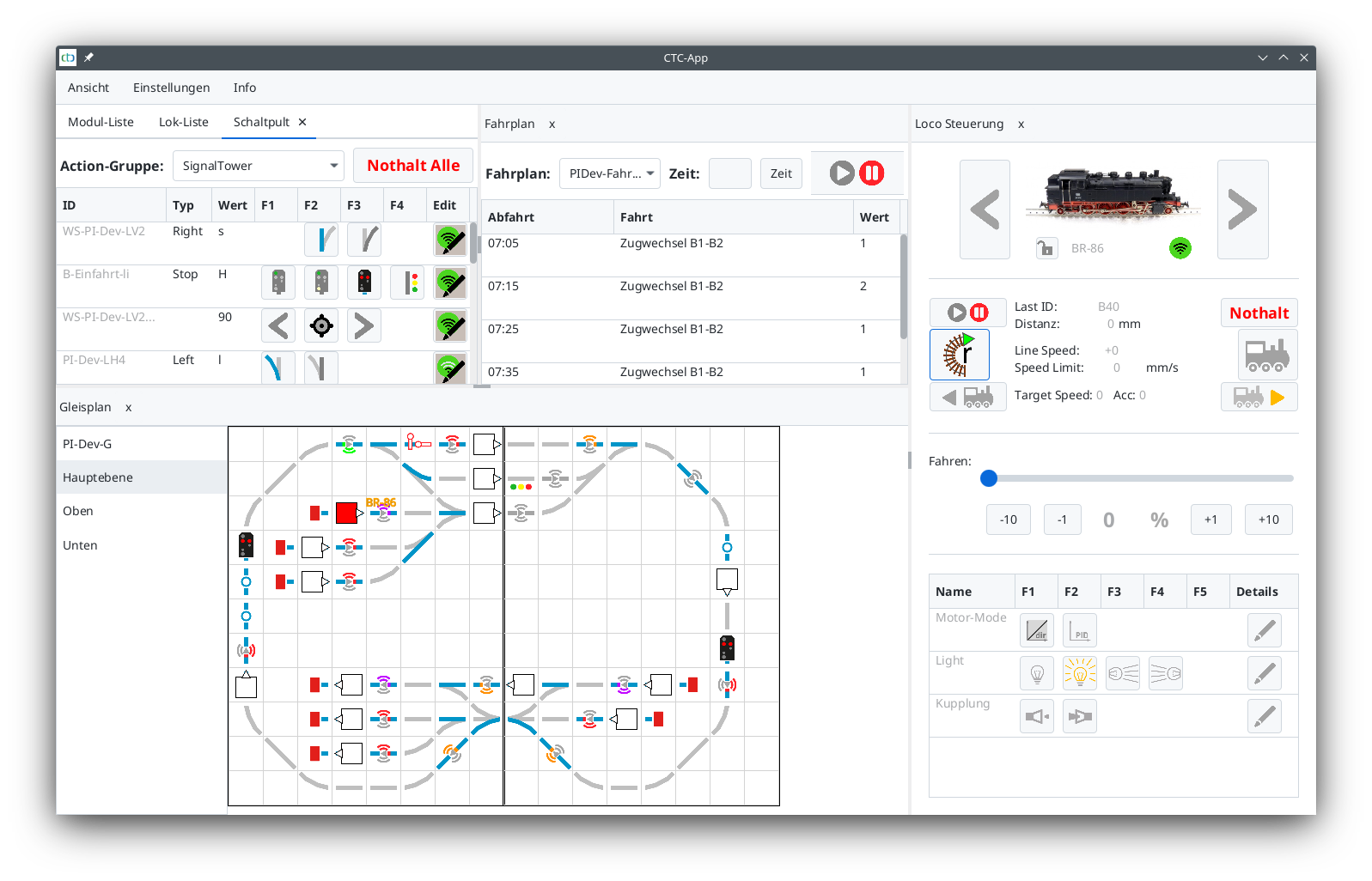
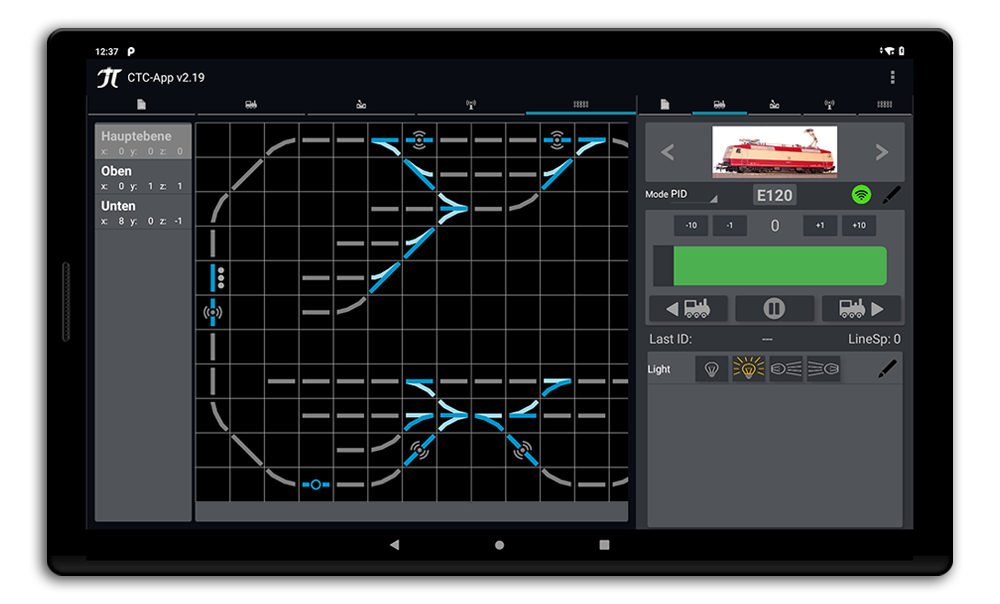
The CTC app allows control of locomotives, turnouts, lighting, action modules, etc., from a PC with Linux, macOS, or Windows, as well as from smartphones and tablets with Android and soon iOS. The PC version is shown above.
The app does not store any data about the model railway. At startup, it reads all necessary information from the respective CTC modules and builds its interface from it. The images of locomotives and the track diagram displayed at the bottom of the app are also read from the corresponding CTC modules.
Configuration of CTC modules, firmware updates, and (one-time) registration of CTC modules in the model railway WiFi are conveniently handled via the CTC app. A special feature is the automatic calibration of the motor sensor in locomotive modules and the graphically assisted tuning of motor parameters (PID controller).
The app coordinates communication with the modules to ensure smooth operation even on large model railways with many CTC modules.
Installation
Software:
- The Android app is currently still provided as an APK file. In the future, apps for Android and then iOS will be available via the respective app stores.
- The PC application is provided as a ZIP file and can be started directly after extraction.
- The access point (router) is delivered fully installed by us. Consequently, we have all details such as the SSID and password of the WiFi. These details are provided to you in a protocol.
- You can of course also configure a WiFi router yourself.
- In both variants, we can deliver the device modules fully configured. The app includes menu items to register and configure device modules in the WiFi.
Hardware:
- Installing the CTC-Loco-Module in a locomotive is comparable to installing a decoder for classic digital control systems: Essentially, four wires need to be connected: two to the rails and two to the DC motor with permanent magnets in the stator. Wound stators are also possible. Additional functions such as lighting and uncouplers would then also need to be wired.
- Installing CTC modules in turnouts is also comparable to installing a decoder for classic digital control systems. For Märklin C-track, the CTC-Turnout-Module is available for installation in the turnout with the same form factor as Märklin decoders. For all other track systems, either the CTC-Turnout-Module or a CTC-Multi-I/O-Board can be used. Various common plug-in and screw systems are available for cable connections.
- Two IR beacons for position detection can be connected to a CTC-Turnout-Module or a CTC-Multi-I/O-Board
Registering a device module in the WiFi:
- Configuration mode: A new device module (without WiFi configuration) sets up its own WiFi network and waits to be configured.
- If a configured device module cannot find its WiFi, it switches to configuration mode after one minute, waits for a connection for one minute, and then resets automatically.
- The CTC app can detect modules in configuration mode at the touch of a button and write the WiFi configuration to the device module. After writing the WiFi configuration, the device module resets automatically and connects to the model railway WiFi.
Registering the control device in the WiFi:
- The device (PC, tablet, smartphone) running the CTC app is connected to the LAN or WiFi as usual for the device.
Commissioning (Boot Process)
Once the access point is started and the WiFi is available, control devices can be connected to the LAN/WiFi as usual for the respective device.
The pre-installed device modules automatically connect to the WiFi as soon as they receive power.
The CTC app automatically detects all device modules present in the same WiFi. Later-starting device modules become visible in the app as soon as they are registered in the WiFi. Registering a device module takes one to a few seconds, provided the reception quality is good. If there are dead spots, the usual options for improving radio coverage apply, e.g., repeaters.
For actuators connected to device modules (e.g., turnouts, signals), a default position can be entered in the device configuration. This is adopted immediately after the module starts, e.g., turnout straight or signal at stop. Alternatively, the initial state can be read via a sensor input. Changes to the configuration are made via the CTC app’s menu.
Track Diagram
Using the CTC app, a simple track diagram can be created in the form of a grid, similar to what is known from many model railway control centers or control programs. As usual with CTC, this is stored in the model railway modules as follows:
- For each contiguous segment of the model railway (e.g., a plate or standard module), select a turnout or I/O module permanently installed on that segment. The track plan for the segment is stored in this module.
- For each individual turnout, signal, switching function, light, etc., the coordinates within the segment track plan are stored in the associated module.
- For the entire model railway, another module is selected in which the arrangement of the individual segments is stored as an overall track plan. The layout can also be divided into multiple track plan sections or levels.
The track plan is conveniently edited via the CTC app.
When the app starts, it finds the overall track plan and displays it. Now turnouts, signals, etc., can be switched via the track diagram display. The respective switch position is of course displayed.
Position Detection
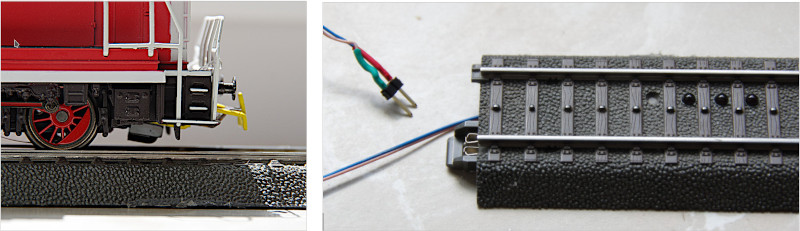
Using infrared signals, a CTC locomotive can determine its position to within a few centimeters. To do this, two infrared transmitters can be connected to each turnout and I/O module. These are then installed in the track bed. In addition, an infrared receiver must be connected to the loco module and mounted on the underside of the locomotive.
Via the app, each infrared transmitter is now assigned an ID and the distance in centimeters to the IR beacon in front is entered. This consists of the ID of the associated track section (2 characters) and a sequential number. The IR beacons of a track section are numbered sequentially in a clockwise direction. The position of the IR beacon is also noted in the track plan.
The IR beacon now cyclically transmits its ID, the distance to the previous IR beacon, and optionally a command. When the locomotive passes the IR beacon, it can use the read ID and the distance to determine its direction of travel and average speed since the last read IR beacon. The locomotive transmits the read ID and the determined speed to the CTC app, after which the app can display the position of the locomotive including direction of travel.
Track sections that have a constant gradient (or incline) between two IR beacons and are completely straight or constantly curved can also be used to calibrate the motor sensor of the loco module. In a suitable loop, the CTC app can perform this calibration automatically.
With a well-calibrated motor sensor, the locomotive is now able to estimate its speed (in mm/s) and also its distance from the last IR beacon. If the model railway layout has an IR beacon approximately every 60 to 100 cm, the position detection will be accurate to within a few centimeters.