





The CTC-Loco-Module-H0d is no longer available. As a replacement, we recommend the CTC-Loco-Module-M3 with cables or with PluX22 and our CTC-Adapter for PluX22 .
The CTC-Loco-Module-H0d is optimized for installation in older locomotives that are either already digital or were offered as digital variants. Locomotives with many functions benefit from the 10 switching outputs and 2 servo connections of this loco module. With an additional motor driver module, a second motor can also be controlled.
| Property | Description |
| Optimized for | Older digital locos, locos with many functions, locos with 2 motors |
| Dimensions | 35 x 20 mm |
| Processor | Espressif ESP32 |
| Input voltage | approx. 9 V to 24 V DC, digital current or AC (with support capacitor) |
| Motor output | 1x DC motor: continuous current 1.0 A, peak 2.8 A 1x connection for additional motor driver module |
| Power outputs | 8x 0.5 A LowSide 2x 1.0 A High-/Lowside |
| Servos | 2x (require external power supply) |
| Max. total current | 2 A |
| Interfaces | CTC-IR receiver, I2C |
Note: In the overview "CTC-Loco-Modules " you will find further modules and links to installation instructions.
Pin Assignment
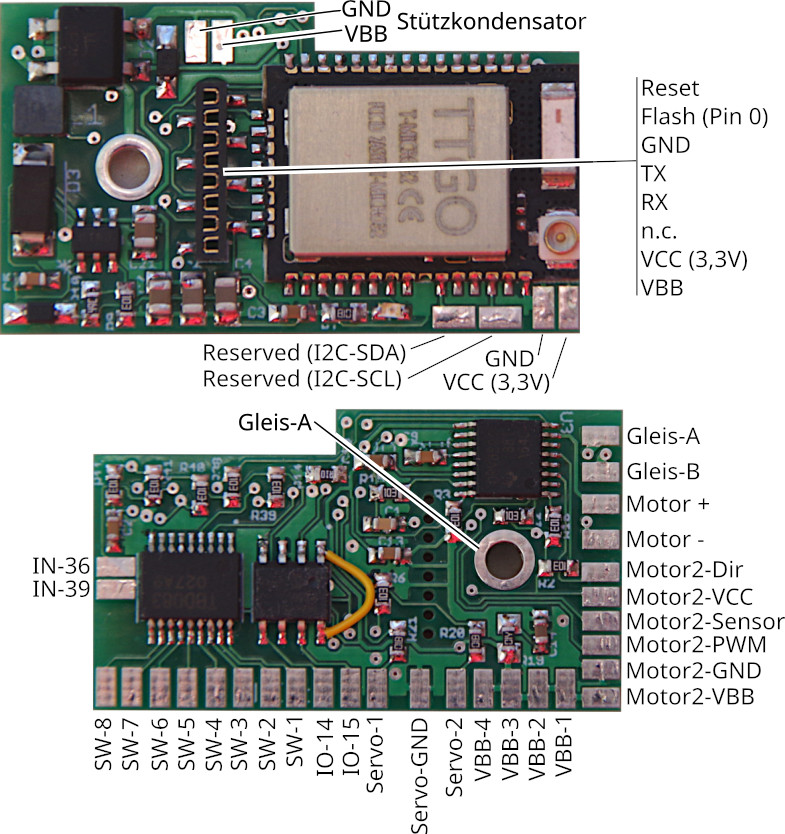
Connection
Standard configuration
- Connect contacts Rail-A and Rail-B to the track or power supply. Alternatively, Rail-A can also be connected via a screw (hole in the PCB). It does not matter whether the track is powered by an analog transformer, a digital control unit, or a power supply, as long as the maximum voltage of 24 V is not exceeded. Since there is a rectifier at the input, it does not matter which pole you connect to Rail-A and Rail-B.
- Connect the support capacitor (electrolytic, min. 400 µF, recommended 1000 µF) to VBB (positive pole) and GND.
- Connect the motor to Motor + and Motor - (for connecting the electromagnet of universal motors, see separate instructions).
- Connect negative poles of front lights to SW-1 and rear lights to SW-2. Connect the positive pole to any VBB connection.
- Optionally connect additional SW connections, e.g., to the negative pole of the electric coupler, smoke generator, or additional lighting. Connect the positive pole to any VBB connection.
- Connect the CTC IR receiver to the programming connector (RX, VCC, GND)
The assignment of pins to switches in the app can be freely configured (Cfg.xml).
Additional Connections
The I2C bus, servos, the second motor, and the reserved pins are not supported by the current firmware. Please contact us if needed.