





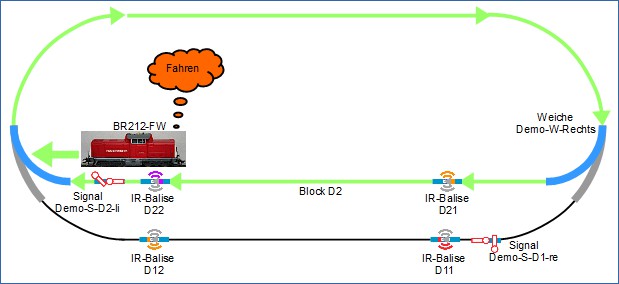
The scenario used here for automated train operation is as follows: The train with locomotive BR212-FW enters the station, slows down and comes to a stop. The train remains at the station for a specified time. After the waiting time, the train continues, completes a clockwise loop, and re-enters the station.
This operation repeats.
The following requirements must be met for automated operation with a locomotive (in this example BR212-FW) in this scenario. It is assumed:
- The track plan is complete, and the beacons are connected to the modules in the turnouts.
- The stopping time of BR212-FW at the station should be 5 seconds.
- The turnouts are set so that BR212-FW can complete a loop and re-enter the station.
- The signals Demo-S-D2-li and Demo-S-D1-re are not used; they are set to "Proceed".
- BR212-FW is used for automated operation; BR365 does not participate.
- The distance from beacon D21 to beacon D22 in this setup is 43 cm. For the command later sent from D21 to BR212-FW, a slightly shorter distance (35 cm) is defined so that the locomotive has safely reached its minimum speed when it arrives at beacon D22.
Before proceeding, a brief explanation of the terms locomotive Halt , locomotive Stop , and locomotive Rückfahrt is useful. These terms are used in accordance with the commands from the beacon as follows:
- Halt refers to an unconditional and unlimited in time stop of the locomotive. As long as a locomotive receives Halt from a beacon, it will not depart.
- Stop refers to an unconditional but time-limited stop communicated in the command of the locomotive. After the waiting time specified in the Stop command has elapsed, the locomotive continues in the same direction .
- Rückfahrt refers to an unconditional but time-limited stop communicated in the command of the locomotive. After the waiting time specified in the Stop command has elapsed, the locomotive continues in the opposite direction . This corresponds to shuttle train operation.
The description of the commands that can be sent from a beacon to the locomotive can be found in the CTC-App manual in the chapter Config - Edit Script (section "Commands for Locomotives / Signals"). These commands will be used later during configuration.
The detailed sequence of the scenario is described below. BR212-FW enters the station track:
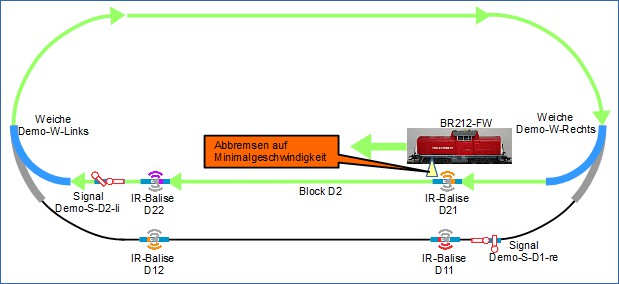
Upon entering the station track, BR212-FW passes beacon D21 and receives the following information: Position ID D21: "I am D21" Distance to the previous beacon in the same block (since there is no previous beacon in the block, this value is 0). Command: "Brake to minimum speed in 35 cm"
Locomotive BR212-FW slows down and continues at minimum speed...
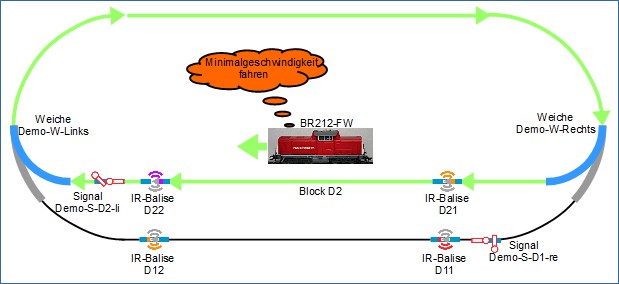
... until beacon D22:
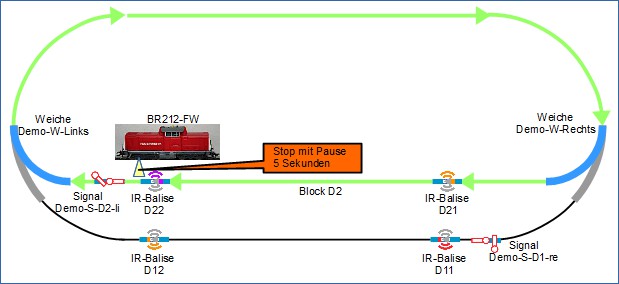
From beacon D22, BR212-FW receives the following information: Position ID D22: "I am D22" Distance to the previous beacon in the same block is 35 cm. Command: "Stop immediately (at distance 0) for 5 seconds" (implicitly, this means that the locomotive will continue after the specified waiting time, provided it is in automatic mode).
The locomotive automatically waits for the waiting time transmitted in the command from the beacon:
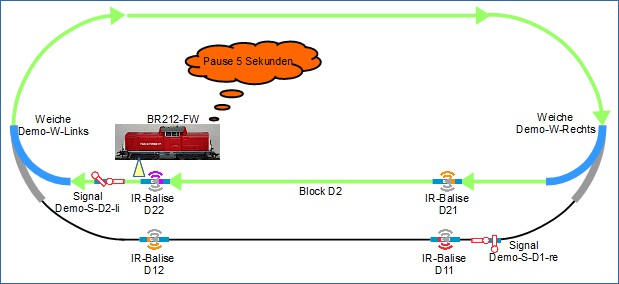
After the waiting time specified in the "Stop" command has elapsed, BR212-FW continues:
These necessary information and commands are configured.
Next, proceed with Automating operation with one locomotive, variant 2
or