





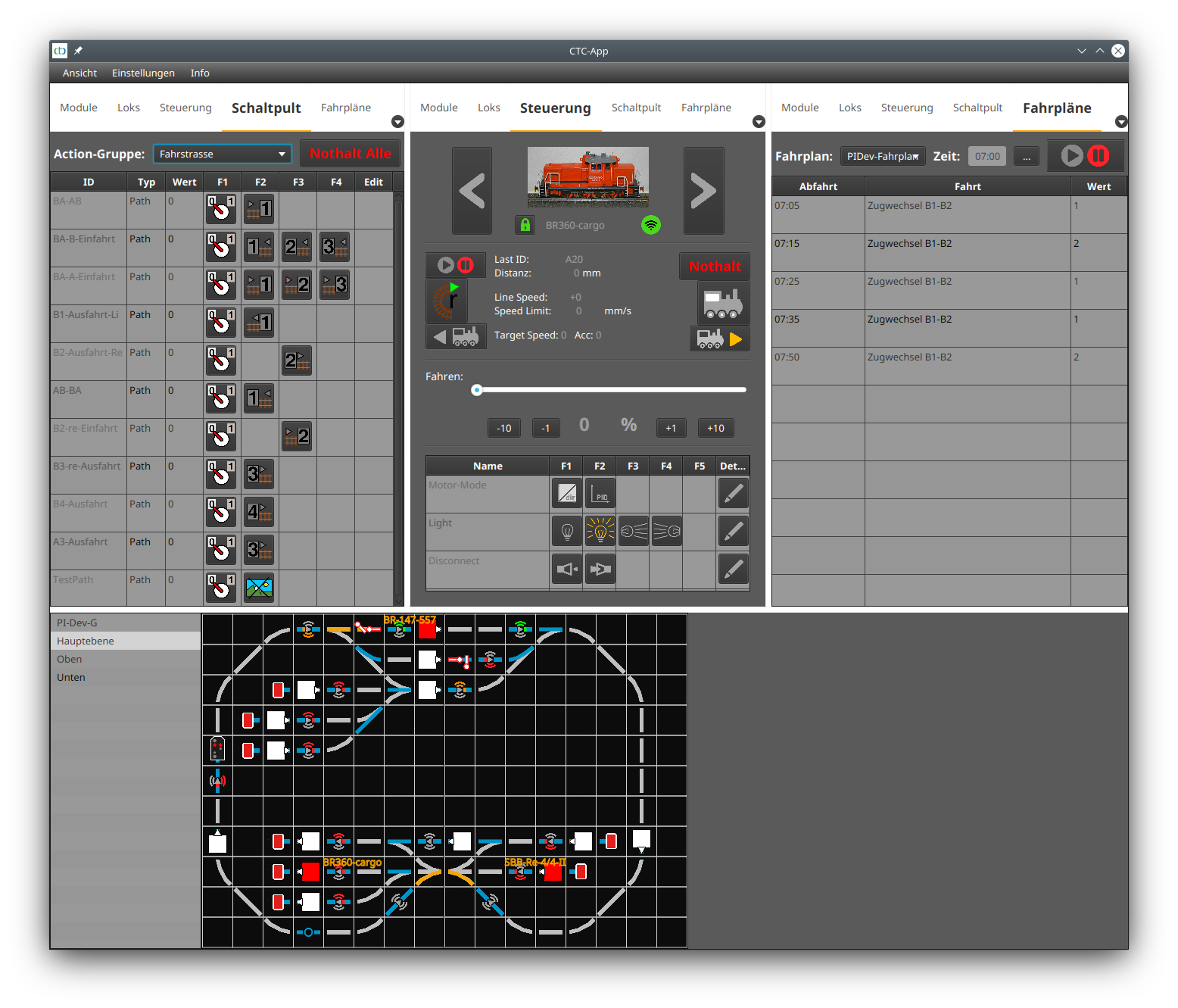
With version 4, the possibilities for automatic operation of the model railway with CTC have been significantly expanded. This article replaces the old article from 2020 .
The way automation works with CTC differs significantly from the concept of classic digital control systems. When designing the automation for CTC, we oriented ourselves on the operation of real railways (ETCS train control system ), making generous use of our technological advantage over classic digital control. The basis for this includes:
- Dividing the model railway into blocks.
- Signals that allow entry into or exit from a block.
- Beacons numbered clockwise so that a locomotive knows which direction it is traveling after passing the second beacon.
- Locomotives that can "see" via ID receivers how the next signal is set and react accordingly.
- Routes that set multiple turnouts and signals at once to enable travel from one block to another.
- Timetables transmitted to the locomotive and processed independently by it.
The foundation for automation with CTC are beacons on the track and corresponding receivers in the locomotive. CTC offers beacons based on infrared (IR) and NFC (RFID) . Unless otherwise specified, there is no difference between IR and NFC for the following considerations.
Additionally, it is important that the sensors of all locomotives participating in automatic operation have been calibrated . Once this is done, the locomotive can determine its actual speed and position and stop precisely at the right point.
Unlike classic sensor systems with track switches, light barriers, or reed relays, the CTC app not only knows that something has passed by, but exactly which locomotive it was. More precisely, the locomotive knows where it is and transmits this information to the CTC app.
Furthermore, the locomotive, like the real-world ETCS , is supplied with route information by the beacon and can independently adjust its speed, stop, and start again. The simplest automation, namely stopping before a red signal, can thus be implemented in CTC without any intervention from the app.
Automatically stopping before a red signal
A beacon linked to a signal informs a passing locomotive of the distance to the signal and its indication. This link between signal and beacon is configured in the CTC module to which the IR beacon is connected. For an NFC beacon, configuration is done via the "Edit automation" dialog.
Based on the ID transmitted by the beacon, both the locomotive and the CTC app know which block the locomotive is currently in. If an exit signal is assigned to the block, the CTC app informs a locomotive stopped in the block as soon as the signal clears the route. The locomotive can then continue its journey independently.
Linking signal and beacon
To link a signal and an IR beacon, open the configuration of the CTC module to which the IR beacon is connected. The easiest way is to right-click on the IR beacon in the track diagram.
Linking a signal and an NFC beacon works almost identically. However, we start with the CTC module where the track plan with the NFC beacon is stored. In the CTC module’s config dialog, click "Edit automation."
How the link is created is explained in the user manual in Chapter 4.3 - Linking actions .
After saving (uploading) the link, we can test whether our configuration works: As soon as a locomotive passes the corresponding beacon before a red signal, it begins to brake.
With a second beacon, we can set the stopping point so precisely that the locomotive comes to a stop directly above the beacon. The first beacon sends the command "minimum speed" with a distance just before the second beacon. The locomotive then brakes and "creeps" the last few centimeters until it receives the signal from the second beacon.
Block control
The principle of block control is used to prevent accidents in railway operations. The entire track is divided into blocks. Signals are used to clear or block blocks. If a train is in a block, the block behind it is blocked to prevent a following train from colliding with it.
With CTC, this principle can be implemented as follows:
- Divide your model railway into blocks identified by a two-character/number ID (e.g., "AB"). Each block has exactly one start and one end. Turnouts are always outside of blocks.
- Place a beacon at the start and end of each block, whose ID begins with the block ID, e.g., "AB1" and "AB2."
- Place an exit signal at the end of the block and assign it a position ID in the track plan as the block ID followed by "+" if it is at the block end clockwise, otherwise "-".
- Link the beacon to the signal.
- Set up one route (see below) for each desired connection to another block at each block.
Routes
Routes are used to set a whole series of turnouts to enable travel from one block to another. Once all turnouts are set, the associated exit signal of the starting block is set to green. A locomotive waiting in front of this signal then starts automatically. Of course, the corresponding exit signal of the destination block must also be set to red for the locomotive to stop in the destination block.
Speed control
Real-world railway signals not only indicate stop and proceed, but also proceed at reduced speed. This is typically used to indicate to the driver that the following turnout is set for diverging and thus speed must be reduced. CTC locomotives also support this signaling, and of course the beacon can transmit this information as well.
Additionally, real-world railways and CTC use signs that limit the permissible speed. For a buffer stop, you can use the "Protection stop" sign—these are the red boards in the track diagram.
Driving orders
Driving orders now allow defining almost arbitrarily complex sequences in combination with beacons to be passed. For each listed beacon, it can be specified what should happen when the locomotive passes it.
When executing a driving order, all beacons to be passed are first sent to the locomotive as a timetable. The timetable is sent to the locomotive located in the block that corresponds to the first beacon mentioned in the driving order. Then the turnouts (ideally the routes) are set.
Good planning is essential
Since many trains are in operation during automatic mode and you don’t want to focus on controlling them, good planning is indispensable:
- When setting routes, the last step should always be opening a signal.
- Consider which blocks should be traveled in which direction.
- When placing beacons, think about how far the receivers in the locomotive are from their start/end. You may need additional beacons depending on whether a train enters the block forwards or backwards.
By the way, the CTC app waits for confirmation of receipt from the CTC module for each switching operation before sending the next command.