





Inhaltsverzeichnis
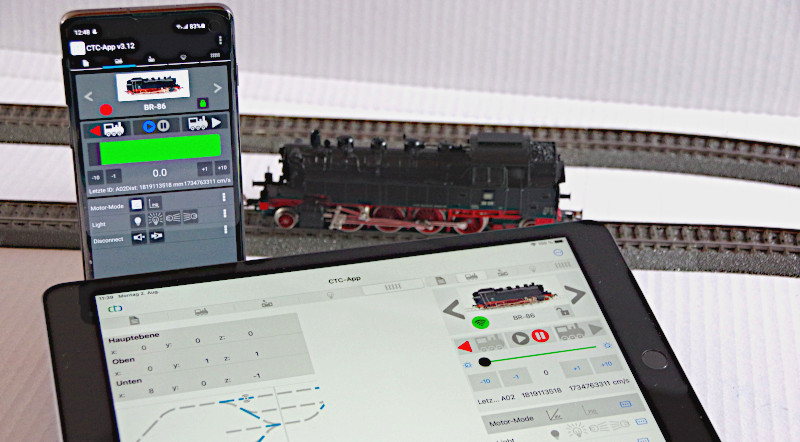
1. Basic Concept
1.1. Locomotives control
1.2. Lok-Funktionen
1.3. Locomotive: Autopilot
1.5. Control Panel: Switching Turnouts, Signals, ...
1.6. Gleisbild: Schalten und Statusanzeigen
2. Installation of the App
3. WiFi
3.1. Module register in the WLAN
3.2. Fabricated new modules
3.3. Status Displays of the Modules
3.4. WiFi-Monitor
3.5. Statistics
3.6. Temporary Wi-Fi
3.7. Module-integrated Wi-Fi
4. Module Configuration
4.1. Config - Connect Products
4.2. Config - Actions
4.3. Config - Link Actions
4.4. Config - Edit Actions
4.5. Config - Edit Script
4.6. Config - Connect DCC Decoder
5. Configure motor
5.1. Motor sensor calibration
5.2. Motor adjustment
6. Gleisbildstellwerk
6.1. Edit track plan
6.2. Model Railway Editing
6.5. Balises (ID transmitters) in the track plan
7. Automation
7.1. Automation: Blocks
7.2. Automation: Routes
7.3. Automation: Train Orders
7.4. Automation: Timetables
8. Old Digital: Bridge to DCC & Co.
8.1. Old Digital: Integrating DCC Decoders
8.2. Old Digital: Integrate Z21 Central Station
8.3. Z21 Handregler nutzen
8.4. Model Railway Control Software via Z21
9. Sound
9.1. Sound with SUSI interface
10. Wagon Identification (Axle Counter)
10.1. Configure wagon identification
10.2. Operating Facility (BW)
11. Config - Create and Edit Script
A.1. Appendix - Error Handling
A.3. Config - Create Product Catalog
A.4. Cable Colors
A.5. Migration to CTC 5.x
A2. Appendix - HTML Page
B.1. Appendix B: Examples
B.2. Config Example: Time-Controlled Stop
B.3. Config Example: Signal Dependent on Switch Position
B.4. Config Example: Balise dependent on switches and signal
B.5. Config example: Track with signals for both directions
B.6. Config Example: Coupling Two Turnouts
Print view
1.1. Locomotives control
1.2. Lok-Funktionen
1.3. Locomotive: Autopilot
1.5. Control Panel: Switching Turnouts, Signals, ...
1.6. Gleisbild: Schalten und Statusanzeigen
2. Installation of the App
3. WiFi
3.1. Module register in the WLAN
3.2. Fabricated new modules
3.3. Status Displays of the Modules
3.4. WiFi-Monitor
3.5. Statistics
3.6. Temporary Wi-Fi
3.7. Module-integrated Wi-Fi
4. Module Configuration
4.1. Config - Connect Products
4.2. Config - Actions
4.3. Config - Link Actions
4.4. Config - Edit Actions
4.5. Config - Edit Script
4.6. Config - Connect DCC Decoder
5. Configure motor
5.1. Motor sensor calibration
5.2. Motor adjustment
6. Gleisbildstellwerk
6.1. Edit track plan
6.2. Model Railway Editing
6.5. Balises (ID transmitters) in the track plan
7. Automation
7.1. Automation: Blocks
7.2. Automation: Routes
7.3. Automation: Train Orders
7.4. Automation: Timetables
8. Old Digital: Bridge to DCC & Co.
8.1. Old Digital: Integrating DCC Decoders
8.2. Old Digital: Integrate Z21 Central Station
8.3. Z21 Handregler nutzen
8.4. Model Railway Control Software via Z21
9. Sound
9.1. Sound with SUSI interface
10. Wagon Identification (Axle Counter)
10.1. Configure wagon identification
10.2. Operating Facility (BW)
11. Config - Create and Edit Script
A.1. Appendix - Error Handling
A.3. Config - Create Product Catalog
A.4. Cable Colors
A.5. Migration to CTC 5.x
A2. Appendix - HTML Page
B.1. Appendix B: Examples
B.2. Config Example: Time-Controlled Stop
B.3. Config Example: Signal Dependent on Switch Position
B.4. Config Example: Balise dependent on switches and signal
B.5. Config example: Track with signals for both directions
B.6. Config Example: Coupling Two Turnouts
Print view